9 Best Brother Embroidery Machines for Home Use (October 2026)
The best Brother embroidery machines for home use include the Brother PE900 for wireless monograms, the Brother SE700 for occasional sewing, and the Brother SE2000 for larger combo designs.
On this page (16 sections)
- How we chose Brother embroidery machines
- Brother PE900: best for wireless monograms
- Brother SE700: best for occasional sewing
- Brother SE2000: best for larger combo designs
- Brother SE1900: best for USB combo projects
- Brother PE800: best for wired file transfers
- Brother PE545: best for small wireless motifs
- Brother Innov-is NQ1700E: best for jacket backs
- Brother SE600: best for basic mending and motifs
- Brother PE535: best for basic USB lettering
- How do you choose the best Brother embroidery machine?
- Should you choose an embroidery-only Brother or a combo?
- How should you set up a Brother embroidery machine?
- What common embroidery mistakes should you avoid?
- How do you care for a Brother embroidery machine?
- Which Brother embroidery machine should you buy?
The best Brother embroidery machine for most home embroiderers is the PE900, because its 5 x 7 in field and wireless transfer suit a broad mix of personal projects. If you also sew, choose a combo such as the SE2000; for a larger 6 x 10 in field, consider the NQ1700E.
Start with the size of the designs you want to stitch, then decide whether your machine should sew as well. That order keeps you from paying for a large embroidery field you rarely use or buying a compact one that forces you to split designs.
For a broader starter checklist, see our machine embroidery beginner gear guide.
Our picks at a glance
-
1

-
2

-
3

How we chose Brother embroidery machines
The best Brother embroidery machine depends on field size, sewing needs and how you plan to transfer designs. We compared those features and considered how each model fits common home projects.
For a first project walkthrough, read our guide to using an embroidery machine for the first time. If you are unsure about field size, compare 4 x 4 and 5 x 7 embroidery machines before choosing.
| Product | Best for | Embroidery field | Built-in designs | Machine type | Our score |
|---|---|---|---|---|---|
| Brother PE900 | wireless monograms | 5 x 7 in | 193 | Embroidery only | 8.9 |
| Brother SE700 | occasional sewing | 4 x 4 in | 135 | Sewing and embroidery | 8.8 |
| Brother SE2000 | larger combo designs | 5 x 7 in | Sewing and embroidery | 8.6 | |
| Brother SE1900 | USB combo projects | 5 x 7 in | Sewing and embroidery | 8.5 | |
| Brother PE800 | wired file transfers | 5 x 7 in | 138 | Embroidery only | 8.4 |
| Brother PE545 | small wireless motifs | 4 x 4 in | 135 | Embroidery only | 8.2 |
| Brother Innov-is NQ1700E | jacket back stitching | 6 x 10 in | 258 | Embroidery machine | 8.1 |
| Brother SE600 | basic mending and motifs | 4 x 4 in | Sewing and embroidery | 8.0 | |
| Brother PE535 | basic USB lettering | 4 x 4 in | 80 | Embroidery only | 7.8 |
Brother PE900: best for wireless monograms
Brother PE900: Best for wireless monograms
- 5 x 7 in embroidery field
- Wireless LAN and USB
- 193 built-in designs
- 13 lettering fonts
A 5 x 7 in field, wireless file transfer and on-screen editing suit larger home embroidery projects. It does not sew.
Pros
- 5 x 7 in embroidery field
- Wireless transfer and USB
- Color sort and jump stitch trimming
Cons
- Embroidery only
- US 120 V use
The PE900 is the strongest all-around choice if you want an embroidery-only machine with a 5 x 7 in field. That extra room over a 4 x 4 in field lets you stitch more designs as one layout, with less need to split the artwork.
Wireless LAN supports file transfer from a PC through Brother's Design Database Transfer software, and the built-in USB port offers a wired option. The 3.7 in touchscreen supports on-screen editing, including resizing, rotating, repositioning and combining designs.
Color sort can change the stitch order of a multicolor design to reduce thread changes, while jump stitch trimming cuts excess jumps within a color. Skip this model if you need one machine to sew seams or mend clothes, since the PE900 is embroidery-only.
The PE900 makes sense for frequent monograms, larger motifs and users who want wireless transfer. Compare it with the earlier Brother PE800 and PE900 if you prefer USB-only file handling or want to weigh the two embroidery-only options.
Brother SE700: best for occasional sewing
Brother SE700: Best for occasional sewing
- 4 x 4 in embroidery field
- 135 built-in designs
- 103 sewing stitches
- Wireless LAN
This combo machine handles everyday sewing as well as embroidery, with wireless transfer and a 4 x 4 in field.
Pros
- Sewing and embroidery in one machine
- Wireless transfer and USB
- 3.7 in color touchscreen
Cons
- 4 x 4 in embroidery field
- US 120 V use
Choose the SE700 if one machine needs to handle both sewing and smaller embroidery projects. Its 4 x 4 in field is suited to names and compact motifs, while 103 built-in sewing stitches cover everyday sewing tasks.
Wireless transfer and a 3.7 in color touchscreen make it easier to move and preview embroidery designs. The automatic needle threader and drop-in top bobbin are useful conveniences when switching between sewing and embroidery.
The tradeoff is the smaller field. Skip the SE700 if your plans regularly include larger lettering or artwork that needs more than 4 x 4 in in one setup.
Our SE600 vs SE700 comparison explains how these two combo machines differ.
Brother SE2000: best for larger combo designs
Brother SE2000: Best for larger combo designs
- 5 x 7 in embroidery field
- 241 sewing stitches
- Wireless LAN and USB
- Color sort and jump stitch trimming
The SE2000 combines a 5 x 7 in embroidery field with sewing functions, wireless transfer and on-screen design editing.
Pros
- 5 x 7 in field on a combo machine
- 241 sewing stitches
- Wireless transfer and USB
Cons
- US 120 V use
- Larger field may be more than small projects need
The SE2000 is the clearest pick if you want a 5 x 7 in embroidery field and sewing functions in one machine. It combines 241 built-in sewing stitches with more than 190 built-in embroidery designs and 13 embroidery fonts.
Wireless LAN and USB both support embroidery file transfer. Its touchscreen edits and previews designs, while color sort and jump stitch trimming can reduce thread changes and clip excess jumps within a color.
This combo suits a home sewing station that will also handle larger embroidery layouts. Skip it if you only want basic small monograms or already own a sewing machine you like; the added sewing capacity and larger field may be more machine than your projects call for.
Brother SE1900: best for USB combo projects
Brother SE1900: Best for USB combo projects

- 5 x 7 in embroidery field
- 240 sewing stitches
- 138 built-in designs
- USB design import
This sewing and embroidery combo has a 5 x 7 in field, a color touchscreen and USB design import.
Pros
- 5 x 7 in field
- 240 sewing stitches
- 11 embroidery fonts
Cons
- USB rather than wireless transfer
- US 120 V use
The SE1900 gives you a 5 x 7 in field with regular sewing functions, making it a capable choice for users who prefer wired design transfer. It has 240 built-in sewing stitches, 138 embroidery designs and 11 embroidery fonts.
Its 3.2 in color touchscreen previews designs, and the USB port imports design files. The 8 included sewing feet support common tasks, so this model can sit at the center of a sewing and embroidery workspace.
Choose it if you want a larger-field combo and USB works for your file routine. Skip it if wireless transfer is a must; the SE2000 better fits that preference.
Brother PE800: best for wired file transfers
Brother PE800: Best for wired file transfers

- 5 x 7 in embroidery field
- 138 built-in designs
- 11 lettering fonts
- USB port
The PE800 offers a 5 x 7 in field and USB design import for home embroidery without combo sewing functions.
Pros
- 5 x 7 in embroidery field
- USB design import
- 11 lettering fonts
Cons
- Embroidery only
- US 120 V use
The PE800 is for users who want a 5 x 7 in embroidery-only machine and USB importing. Its 138 built-in designs include florals, scrollwork and quilt patterns, with 11 lettering fonts for names and monograms.
The 3.2 in color touchscreen previews designs before stitching. USB transfer makes sense if you already keep your designs on a computer or drive and do not need wireless movement between devices.
Skip the PE800 if you need regular sewing or want wireless transfer. The PE900 adds wireless options and more built-in designs.
See our PE800 vs PE900 guide for a closer comparison.
Brother PE545: best for small wireless motifs
Brother PE545: Best for small wireless motifs

- 4 x 4 in embroidery field
- 135 built-in designs
- Wireless LAN and USB
- 3.7 in touchscreen
Wireless transfer, a touchscreen and a 4 x 4 in field make the PE545 a focused option for smaller embroidery.
Pros
- Wireless transfer and USB
- Touchscreen design positioning
- 135 built-in designs
Cons
- Embroidery only
- 4 x 4 in field
The PE545 is a focused choice for small embroidery with wireless transfer. Its 4 x 4 in field, 135 built-in designs, 10 lettering fonts and 3.7 in touchscreen cover names, small motifs and similar personal projects.
You can transfer files over wireless LAN or use the USB port. The touchscreen supports design positioning and preview, and tutorial videos can help with basic setup.
Skip this model if you need a sewing machine or often stitch designs larger than 4 x 4 in. The PE900 offers more room for larger embroidery, while the SE700 adds sewing functions if a combo matters more.
Brother Innov-is NQ1700E: best for jacket backs
Brother Innov-is NQ1700E: Best for jacket back stitching

- 6 x 10 in embroidery field
- 258 built-in designs
- Wireless capability
- Full-color touchscreen
Its 6 x 10 in field suits larger designs such as jacket backs. This option also includes BES Blue software and a magnetic sash frame hoop.
Pros
- Largest field among these picks
- 258 built-in designs
- On-screen design positioning
Cons
- Larger projects need more workspace
- Package accessory availability may vary
The NQ1700E suits larger projects that need a 6 x 10 in embroidery field, such as jacket backs. The extra area gives you more room to position a large design as one piece.
It has 258 built-in designs and a full-color touchscreen for positioning, rotating, reflecting and tracing designs. This package also includes BES Blue embroidery software and a magnetic sash frame hoop, which may appeal to users who want software and a larger hoop in the same setup.
Choose it when large work is a regular part of your plans and you have room for a larger project station.
Skip it for small motifs or occasional monograms, where a smaller field may be easier to justify. Confirm the availability of the included software and hoop if those accessories are key to your decision.
Brother SE600: best for basic mending and motifs
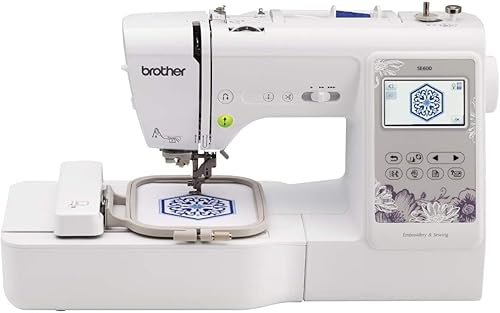
Brother SE600: Best for basic mending and motifs
- 4 x 4 in embroidery field
- 103 sewing stitches
- 80 built-in designs
- Seven sewing feet
The SE600 combines sewing and embroidery in a 4 x 4 in field, with a color touchscreen for design previews.
Pros
- Sewing and embroidery in one machine
- 103 sewing stitches
- 80 built-in designs
Cons
- 4 x 4 in field
- US voltage details differ across product information
The SE600 is a basic sewing and embroidery combo for small designs and everyday sewing. Its 4 x 4 in embroidery field pairs with 103 built-in sewing stitches, 80 embroidery designs and 6 embroidery fonts.
The 3.2 in color touchscreen previews designs. An automatic needle threader and drop-in top bobbin help simplify setup, and the included feet cover common sewing tasks.
Choose it if the combination of sewing and small embroidery matters more than wireless transfer. Skip it if you want a larger embroidery field, more built-in designs or wireless file movement; the SE700 or SE2000 better matches those needs.
Brother PE535: best for basic USB lettering
Brother PE535: Best for basic USB lettering

- 4 x 4 in embroidery field
- 80 built-in designs
- USB design import
- Nine lettering fonts
A 4 x 4 in field, USB design import and built-in lettering cover small personal embroidery projects.
Pros
- USB design import
- Touchscreen design preview
- 80 built-in designs
Cons
- Embroidery only
- 4 x 4 in field
The PE535 fits small, personal embroidery projects such as names and compact motifs. It has a 4 x 4 in field, 80 built-in designs and 9 lettering fonts, with a USB port for importing custom designs.
The 3.2 in color touchscreen previews designs before stitching. As an embroidery-only machine, it will not sew garment seams or handle ordinary mending.
Choose it if you want a straightforward small-field embroidery setup and USB fits your workflow. Skip it if you need a combo machine, wireless transfer or room for larger designs.
How do you choose the best Brother embroidery machine?
The best Brother embroidery machine for you is the one whose field fits your regular designs and whose functions match your other sewing needs. Choose field size first, then decide between embroidery-only and combo operation, and finally compare transfer methods.
A 4 x 4 in field works for many names, small motifs and compact patches. A 5 x 7 in field gives you more room for larger layouts, while the NQ1700E's 6 x 10 in area can accommodate bigger pieces such as jacket backs.
Measure the design itself, not the garment or blank item. If a design is wider than the embroidery field, rotating it may help only if the resulting dimensions fit; otherwise, you may need to split the design or use a larger-field machine.
Your transfer routine matters too. Wireless LAN is available on the PE900, SE700, SE2000 and PE545.
The PE800, SE1900 and PE535 support USB importing, which may suit a simple computer-to-machine workflow.
Should you choose an embroidery-only Brother or a combo?
Choose an embroidery-only model if you already have a sewing machine or do not need regular sewing. The PE900 and PE800 have 5 x 7 in fields, while the PE545 and PE535 suit smaller work with 4 x 4 in fields.
A combo machine is the practical choice if you want one machine for sewing and embroidery. The SE700 and SE600 have 4 x 4 in fields; the SE2000 and SE1900 offer 5 x 7 in fields.
Do not let the number of sewing stitches decide the embroidery fit. Sewing stitch variety does not make the embroidery field larger, so check those two needs separately.
How should you set up a Brother embroidery machine?
Set up on a steady surface with enough room for the machine, hoop and fabric to move without catching. A clear work area helps you keep the fabric flat and see the design as it stitches.
Read the model's manual before attaching the embroidery arm or hoop. Thread the machine as directed, use the embroidery foot and bobbin arrangement specified for the model, and confirm the hoop is attached securely before starting.
For a first project, choose a simple design that fits comfortably inside the field. Practice on a piece of similar fabric with stabilizer, then check that the design is positioned where you want it before stitching on a finished garment or gift.
What common embroidery mistakes should you avoid?
The most common avoidable errors are choosing a design too large for the field, hooping fabric unevenly and skipping a practice run. Each can waste material or leave a design positioned differently than you expected.
Check the design dimensions before transferring it. Keep the fabric smooth and taut in the hoop without stretching it out of shape, and use stabilizer suited to the fabric and project.
Also confirm that your design file is compatible with your machine before transfer. If a project uses several thread colors, organize the colors in advance and pause when the machine signals a thread change.
How do you care for a Brother embroidery machine?
Keep lint from building up around the bobbin area and follow the cleaning and oiling instructions in the machine manual. Use the cleaning brush supplied with several models, and avoid adding oil unless the manual calls for it.
Replace a needle when it becomes bent, dull or damaged, and use a needle suited to the fabric and thread. A fresh needle and a clean bobbin area can help prevent skipped stitches and thread trouble.
Store the machine with its cover when it is not in use, and keep hoops, feet and small accessories together. For more detail, see our embroidery machine care guide.
Which Brother embroidery machine should you buy?
Choose the PE900 if you want a wireless 5 x 7 in embroidery-only machine for varied home projects. Pick the SE2000 if you want that larger field with sewing functions, or the SE700 if a smaller combo field fits your designs.
For larger work such as jacket backs, the NQ1700E gives you a 6 x 10 in field. For compact embroidery, choose the PE545 if wireless transfer matters or the PE535 if USB importing is enough.
If you are still weighing sewing and embroidery in one machine, use our SE600 vs SE700 comparison. Match the machine to the designs you will actually stitch, then confirm the field size and transfer method before buying.
Our top 3 picks at a glance
-
1
-
2
-
3
Frequently asked questions
Which Brother embroidery machine is best for home use?
The PE900 suits home embroiderers who want a 5 x 7 in field, wireless file transfer and embroidery-only operation. If you also want to sew, consider the SE700 or SE2000.
Match the embroidery field to your usual designs, then choose between a dedicated embroidery machine and a sewing combo.
Which Brother embroidery machines also sew?
The SE700, SE2000, SE1900 and SE600 combine sewing and embroidery. The SE700 and SE600 have 4 x 4 in fields, while the SE2000 and SE1900 have 5 x 7 in fields.
Choose based on your embroidery size and the sewing features you expect to use.
Is a 4 x 4 in embroidery field enough?
A 4 x 4 in field works for many small names, motifs and patches, but limits the size of one design. Larger artwork may need repositioning or rehooping.
Compare the stitched design dimensions with the field before choosing a machine.
What is the difference between the Brother PE900 and SE700?
The PE900 is an embroidery-only machine with a 5 x 7 in field. The SE700 combines sewing and embroidery, with a 4 x 4 in field.
Choose the PE900 for larger embroidery designs, or the SE700 if you also need sewing functions.
Can Brother embroidery machines use custom designs?
Several models here support USB design import, and the PE900, SE700, SE2000 and PE545 also offer wireless transfer. File compatibility depends on the machine and format, so check that a design file works with your model before transferring it.