Brother SE600 vs SE700: Which Should You Buy? (October 2026)
Choose the SE700 for wireless design transfer, more built-in designs and a larger screen; choose the SE600 if you don't need those extras. Both combine sewing and embroidery, with a 4 x 4 in embroidery field and 103 built-in sewing stitches.
On this page (8 sections)
- Brother SE600 vs SE700: what are the main differences?
- Is the SE700 worth choosing for wireless transfer?
- Which machine gives you more embroidery choices?
- Does the larger SE700 screen matter?
- Which machine is better for sewing?
- Is the Brother PE535 a better alternative?
- What should you check before choosing?
- Brother SE600 vs SE700: which should you buy?
Choose the SE700 for wireless design transfer and more built-in embroidery choices; choose the SE600 if its 80 designs and 6 fonts are enough. In this Brother SE600 vs SE700 comparison, both have a 4 x 4 in embroidery field, so the decision rests on the screen, built-in designs and file workflow.
Both machines combine sewing and embroidery, with 103 built-in sewing stitches and a 4 x 4 in embroidery field. Neither gives you a larger embroidery area than the other.
The best Brother embroidery machines for home use guide compares more models if you haven't narrowed your choice to these 2.

Brother SE600 vs SE700: what are the main differences?
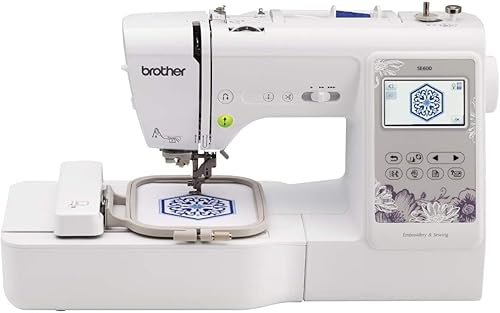
The SE700 has more built-in embroidery designs, more lettering fonts, a larger touchscreen and wireless LAN. The SE600 keeps the same 4 x 4 in field and 103 sewing stitches, but has fewer embroidery options.
| Feature | Brother SE700 | Brother SE600 |
|---|---|---|
| Embroidery field | 4 x 4 in | 4 x 4 in |
| Built-in embroidery designs | 135 | 80 |
| Embroidery lettering fonts | 10 | 6 |
| Color touchscreen | 3.7 in | 3.2 in |
| Built-in sewing stitches | 103 | 103 |
| Wireless LAN transfer | Yes | Not specified |
| Sewing feet included | 8 | 7 |
Those differences matter most if you expect to use the built-in designs or move files wirelessly. If you mainly want a combo machine for occasional projects, the shared field size and stitch count may matter more than the added design options.
Is the SE700 worth choosing for wireless transfer?
Choose the SE700 if you want to send embroidery files over a wireless network. Its wireless LAN works with Brother's free Design Database Transfer software for PC file transfer, and it also has a USB port.
The SE700 works with Brother's Artspira mobile app for drawing patterns on a mobile device or downloading designs and transferring them wirelessly. App and device compatibility can vary, and wireless transfer requires a network connection.
The SE600's listed features don't specify wireless transfer. If you prefer a basic setup built around the designs already in the machine, that difference may not affect your decision.
Before choosing either machine, think about where your designs come from. If you use a computer or phone to create and collect patterns, wireless transfer can reduce the steps involved; if you mostly use built-in patterns, it may add little value.
For an embroidery-only alternative with USB design import, see our Brother PE800 vs PE900 comparison. If you want to learn how PES files and other formats work, read our guide to embroidery file formats.
Which machine gives you more embroidery choices?
The SE700 offers 135 built-in designs and 10 embroidery lettering fonts, compared with 80 designs and 6 fonts on the SE600. That gives you more starting points for personalizing gifts, clothing and home projects.
The SE600's built-in designs include decorative alphabet, borders, holiday, floral, kids and applique options. Its 6 lettering fonts support personalization without importing a separate design.
The SE700's larger built-in selection may help if you want more patterns ready on the machine. It still has the same 4 x 4 in embroidery field, so a greater number of designs doesn't make the field larger.
If you plan to stitch names, initials or small motifs, both machines offer built-in lettering. The products' 4 x 4 in fields define their embroidery area.
Does the larger SE700 screen matter?
The SE700's 3.7 in color touchscreen gives you a larger on-screen area than the SE600's 3.2 in display. The SE700 supports on-screen editing of embroidery designs, while both let you preview designs before stitching.
A larger display can make it easier to view options and edit a design on the machine. It doesn't change the stitch area, so don't confuse screen size with the embroidery field.
The SE600's 3.2 in screen lets you preview designs in color. If you do most design work on a computer or phone, the screen difference may matter less than wireless transfer or the built-in design count.
Which machine is better for sewing?
Neither has an advantage in sewing stitch count: both include 103 built-in stitches and 10 auto-size buttonhole styles. The SE600 includes 7 sewing feet, while the SE700 includes 8.
Both have an automatic needle threader and a drop-in top bobbin. Those features can reduce some setup steps, but they don't replace learning to thread the machine and manage fabric.
If sewing is your main goal, consider whether you need embroidery in the same machine. The Brother SE1900 review covers another combo machine, and our first machines guide helps you think through the features that matter for a first purchase.
The SE700's extra sewing foot may be useful depending on your projects, but the included feet differ. Check the included set if a specific foot is important to you.
Is the Brother PE535 a better alternative?
Choose the PE535 if you want embroidery without a built-in sewing function. It has a 4 x 4 in field, 80 designs, 9 font styles and a USB port for importing designs.
Unlike the SE600 and SE700, the PE535 doesn't function as a traditional sewing machine. It's a focused option if you already have a sewing machine and want a separate embroidery unit.
If you need one machine for both jobs, stay with the SE700 or SE600. Our machine embroidery beginner gear guide covers supplies and setup choices that go with either kind of machine.
What should you check before choosing?
Choose by workflow first, then confirm that the 4 x 4 in field fits your usual projects. The SE700 adds features, but it doesn't enlarge the area you can embroider in one setup.
Consider these questions:
- Do you want to transfer designs wirelessly from a PC or use the Artspira app?
- Will you use the SE700's extra designs and lettering fonts?
- Is the larger touchscreen useful for editing on the machine?
- Do you need sewing and embroidery in the same machine?
- Will your common designs fit a 4 x 4 in field?
Check the space where you'll set up the machine and plan for room to position fabric and hoop it. A suitable table helps keep your work area steady; see our guide to embroidery machine tables.
Both products are intended for sale in the United States at 120 volts, and using or selling them elsewhere may affect warranty coverage. Confirm that the machine's voltage and support terms suit your location before buying.
Brother SE600 vs SE700: which should you buy?
Pick the SE700 if wireless transfer, a larger touchscreen and more built-in embroidery options will save you steps. Pick the SE600 if you want a sewing and embroidery combo with the same field and stitch count, and don't need those additions.
If your priority is embroidery only, consider the PE535 instead. For a wider look at Brother options, start with the Brother embroidery machine guide.
Our score weighs specs, features and buyer feedback against what you're shopping for.
Frequently asked questions
What is the main difference between the Brother SE600 and SE700?
The SE700 adds wireless LAN, 135 built-in embroidery designs, 10 lettering fonts and a 3.7 in color touchscreen. The SE600 has 80 designs, 6 lettering fonts and a 3.2 in touchscreen.
Both have a 4 x 4 in embroidery field and 103 built-in sewing stitches.
Can the Brother SE600 and SE700 both sew?
Yes. Both are sewing and embroidery combo machines with 103 built-in sewing stitches, including 10 styles of auto-size buttonholes.
The PE535 is different: it's an embroidery machine and doesn't function as a traditional sewing machine.
Does the Brother SE700 need USB to transfer designs?
No. The SE700 can transfer embroidery files from a PC over a wireless network using Brother's free Design Database Transfer software, and it also has a built-in USB port.
Wireless use depends on a network connection.
Wireless transfer isn't specified for the SE600.
Can either machine embroider designs larger than 4 x 4 inches?
Both machines have a 4 x 4 in embroidery field. The product data doesn't describe stitching a larger design in sections, so check with Brother if you need to make artwork larger than that field.
Which machine is better for a beginner?
Either can suit a beginner who wants sewing and embroidery in one machine. The SE600 offers fewer built-in embroidery options, while the SE700 adds wireless transfer and more designs and fonts.
Choose based on the features you'll use.