Machine Embroidery for Beginners: Gear You Actually Need
Machine embroidery for beginners needs a compatible embroidery machine, embroidery thread, stabilizer and a hoop that fits the design. Start with a small project and add specialty gear only when a real project calls for it.
On this page (7 sections)
- What gear do you need for machine embroidery?
- Which embroidery machine should a beginner choose?
- What thread and bobbin thread should you buy first?
- What stabilizer helps a beginner get started?
- Which accessories can wait until later?
- How do you set up a first embroidery project?
- What should you buy first for machine embroidery?
Machine embroidery for beginners starts with an embroidery machine, compatible hoop, thread, stabilizer and a design the machine can read. You can add specialty accessories when a project calls for them.
Choose the machine around the projects you want to make. A 4 x 4 in embroidery field can suit small names and motifs, while larger designs need a larger field or a plan to stitch in sections.
This guide covers the first gear to buy, what each item does and what can wait. For a closer look at starter models, see our first embroidery machine guide.
What gear do you need for machine embroidery?
You need a machine, a hoop that fits the design, embroidery thread, bobbin thread, stabilizer and fabric. Start with a small design on a stable fabric so you can learn threading, hooping and file transfer without adding too many variables.
| Gear | What it does | Buy first? |
|---|---|---|
| Embroidery machine | Stitches the design | Yes |
| Hoop | Holds the fabric and stabilizer in place | Yes, if not included |
| Embroidery thread | Forms the visible design | Yes |
| Bobbin thread | Sits underneath the embroidery stitches | Yes |
| Stabilizer | Supports fabric while stitching | Yes |
| Fabric and a design file | Give you a first project to stitch | Yes |
| Extra hoops, software or specialty tools | Support specific projects | Later |
Check what comes with your machine before buying accessories. Some models include a hoop, needles and bobbins, while others may require you to add supplies.
Which embroidery machine should a beginner choose?
Choose a machine based on whether you also want to sew, how large your designs will be and how you'll transfer them. A larger field gives you more room for single hooping, but it can also mean a different budget and footprint.
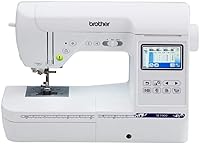
A combination machine can be useful if you want one machine for sewing and embroidery. The Brother SE700 is a sewing and embroidery machine with a 4 x 4 in embroidery field, built-in designs and fonts, a touchscreen, USB and wireless file transfer options.
An embroidery-only machine keeps your focus on stitching designs. The Brother PE545 has a 4 x 4 in embroidery field, built-in designs and fonts, a touchscreen and wireless or USB transfer.
Both models are intended for use in the US at 120 volts. Confirm the power requirements for your location before buying.
If you are deciding between embroidery-only and combination models, compare the best Brother embroidery machines for home use. For larger designs, our guide to embroidery machines with a large hoop explains what to check.
How large should the embroidery field be?
Choose a field that fits the largest design you expect to stitch in one placement. The hoop's outer size and the machine's usable embroidery field are not always the same, so check the field measurement when comparing machines.
A 4 x 4 in field is enough for many small projects, such as monograms and compact motifs. If you want to stitch larger artwork, compare the 4 x 4 vs 5 x 7 embroidery machine guide before choosing.
A larger field does not make every project easier. You still need to hoop the fabric evenly and keep the design within the allowed area.
What thread and bobbin thread should you buy first?
Start with embroidery thread in a few colors you expect to use, plus the bobbin thread recommended for your machine. Embroidery thread makes the design visible, while bobbin thread supports the stitches underneath.
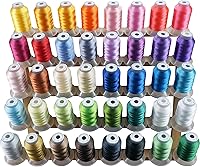
A multicolor set can make it easier to try different designs without choosing every spool separately. The brothread 40 Color Thread Kit has 40 polyester thread colors, with 500 m per spool.
Before stitching, check that the thread fits your machine and project. Thread tension, needle choice and fabric can affect stitch quality, so change one thing at a time when troubleshooting.
Bobbin thread is a separate choice from the top thread. See our guide to what bobbin thread to use for machine embroidery before stocking up.
What stabilizer helps a beginner get started?
A stabilizer supports the fabric while the machine stitches. Tear-away stabilizer is a useful first option for many firmly woven fabrics and light to medium stitch density designs.
The brothread Tear Away 12 x 50 Yd Roll is a medium-weight, 12 in wide stabilizer. It is intended for natural fibers and thicker, softer fabrics, and the roll can be cut to fit different hoops.
Tear-away is not the right match for every fabric or design. Stretch fabrics, sheer materials and dense designs may need a different stabilizer or more support.
Compare options in our tear-away embroidery stabilizer guide.
Which accessories can wait until later?
You can wait on specialty hoops, a large thread rack and advanced design software until you have a project that needs them. Buy accessories to solve a known setup problem, such as a design that exceeds your hoop size or fabric that shifts during stitching.
A few simple tools can help with early projects: small scissors for trimming thread, spare needles that match your machine and a container for bobbins. Check your machine's included accessories before buying duplicates.
A larger hoop only helps if it is compatible with your machine and suits the fabric and design. If you are considering one, read our guide to magnetic embroidery hoops and check the machine maker's compatibility information.
How do you set up a first embroidery project?
Start with a simple design, stable fabric and the supplies recommended for your machine. A small test design lets you learn the setup before you stitch a larger or more costly project.
- Choose a design that fits the machine's embroidery field.
- Select fabric and stabilizer suited to the design.
- Hoop the fabric and stabilizer without stretching the fabric.
- Thread the machine and bobbin as the manual directs.
- Transfer or select the design, then preview its placement.
- Stitch the design and check the result before moving to a larger project.
If the result puckers or shifts, check the hooping, stabilizer, needle and thread path before changing several settings at once. Our first-time embroidery machine guide walks through a beginner setup.
What should you buy first for machine embroidery?
Buy the machine and basic supplies around the projects you plan to stitch: a 4 x 4 in field for small designs, or a larger field if your usual designs need more room. Add thread colors, stabilizer types and specialty hoops as you learn what your fabric and projects require.
Choose the SE700 if you also want sewing functions in the same machine. Choose the PE545 if you want an embroidery-only machine.
Then start with thread, bobbin thread, stabilizer and a small design that fits the included hoop.
For a full overview of machine choices and first purchases, continue to our beginner embroidery machine guide.
Frequently asked questions
What do you need to start machine embroidery?
Start with an embroidery machine, a compatible hoop, embroidery thread, bobbin thread, stabilizer, fabric and a design file the machine can read. A needle, small scissors and a way to transfer designs may also help, depending on the machine.
Buy specialty hoops and thread colors as projects require them.
Can a beginner use a sewing and embroidery machine?
Yes. A combination machine can sew and embroider, which may suit you if you want both functions in one machine.
Check the embroidery field, included hoop and file transfer options.
An embroidery-only machine is a better fit if sewing is not part of your plans.
Do beginners need embroidery software?
Not always. Some machines include built-in designs and fonts, and some let you transfer files by USB or wireless connection.
Design software matters if you want to create or edit custom files beyond what the machine offers.
Check the machine's supported file formats and transfer methods first.
What stabilizer should a beginner buy?
A medium-weight tear-away stabilizer is a practical starting point for many firmly woven fabrics and light to medium stitch designs. Stretchy, delicate or lofty fabrics may need a different type or placement.
Match the stabilizer to the fabric and design, and follow the machine or stabilizer maker's guidance.
Is a 4 x 4 hoop big enough for a beginner?
A 4 x 4 hoop can suit names, small motifs and starter projects, but the design must fit within the machine's embroidery field. Larger designs may need a larger field or careful repositioning with compatible equipment.
Choose the field around the projects you expect to make, not a hoped-for future project.