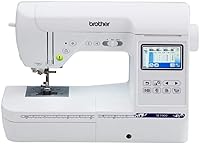
Brother SE1900 Sewing and Embroidery Machine Review: Worth It? (October 2026)
The Brother SE1900 suits you if you want sewing and embroidery in one machine with a 5 x 7 in embroidery field. Its main trade-off is that it uses USB for design file import, while the SE2000 and SE700 support wireless transfer.

On this page (7 sections)
The Brother SE1900 is a sewing and embroidery combo with a 5 x 7 in embroidery field. It has 240 built-in sewing stitches, 138 embroidery designs, a 3.2 in color touchscreen and a USB port for design file import.
Its main trade-off is file transfer: the SE1900 uses USB, while the SE2000 and SE700 support wireless transfer. Choose the SE1900 if you want sewing and embroidery in one machine with a larger field.
What does the Brother SE1900 offer?
The SE1900 combines sewing, embroidery and on-screen design preview in one machine. Its 5 x 7 in embroidery field can accommodate larger designs than a 4 x 4 in field.
Brother SE1900: Best for sewing and larger embroidery

- 5 x 7 in embroidery field
- 240 built-in sewing stitches
- 138 embroidery designs
- 3.2 in color touchscreen
A sewing and embroidery combo with a 5 x 7 in field, on-screen design preview and USB file import.
Pros
- Combines sewing and embroidery
- 5 x 7 in embroidery field
- Touchscreen preview and editing options
- 11 embroidery fonts
Cons
- USB port for design file import
- The 3.2 in display is smaller than the SE2000's 3.7 in screen
- US 120-volt use
The machine has 240 built-in sewing stitches, including 10 auto-size buttonhole styles, and 138 built-in embroidery designs. Its 11 embroidery fonts include 7 English, 3 Japanese and 1 Cyrillic font.
You can preview designs and browse editing options on the 3.2 in color touchscreen. The SE1900 also supports combining designs, changing colors and importing design files through its built-in USB port.
Who is the SE1900 best for?
The SE1900 suits a home sewer who also wants to embroider with one machine. Its 5 x 7 in field can fit larger lettering or designs than a 4 x 4 in field.
It may not fit if wireless design transfer is a priority or if you only want embroidery. The Brother PE800 vs PE900 comparison can help if you are considering an embroidery-only machine.
How does the 5 x 7 in field affect projects?
A 5 x 7 in field can hold larger designs in one hooping than a 4 x 4 in field. This can reduce repositioning for some names, motifs and layouts, but each design needs to fit within the usable embroidery area.
The SE1900 includes a 5 x 7 in hoop. Check design dimensions before transferring a file, and plan garment placement so the hoop and machine have room to move.
A 4 x 4 in field may be enough for small monograms or compact motifs. Our guide to 4 x 4 vs 5 x 7 embroidery machines explains how field size changes your options.
Does the SE1900 sew as well as it embroiders?
The SE1900 offers 240 built-in sewing stitches for regular sewing tasks alongside embroidery. It also has an advanced needle threader, a drop-in top bobbin and 10 styles of auto-size buttonholes.
The built-in stitches include decorative options. The SE1900 also has My Custom Stitch, which lets you create and save custom sewing stitches for later use.
The PE800 is an embroidery-only machine. If you already have a sewing machine, the Brother PE800 is another option for embroidery projects.
How does the SE1900 compare with the SE2000 and SE700?
The SE1900 has a 5 x 7 in embroidery field and 240 sewing stitches. The SE2000 also has a 5 x 7 in field, while the SE700 has a 4 x 4 in field and wireless transfer.
| Model | Sewing and embroidery | Embroidery field | File transfer | Display |
|---|---|---|---|---|
| Brother SE700 | 103 stitches; 135 designs | 4 x 4 in | Wireless LAN and USB | 3.7 in |
| Brother SE2000 | 241 stitches; 193 built-in designs plus 50 downloadable | 5 x 7 in | Wireless LAN and USB | 3.7 in |
| Brother SE1900 | 240 stitches; 138 designs | 5 x 7 in | USB | 3.2 in |
| Brother PE800 | Embroidery only; 138 designs | 5 x 7 in | USB | 3.2 in |
Choose the SE2000 if wireless transfer and its 3.7 in touchscreen matter more than the SE1900's feature set. Choose the SE700 if wireless transfer matters and a 4 x 4 in field fits your projects.
The Brother SE600 vs SE700 guide covers another compact-field comparison. For more options, browse our guide to Brother embroidery machines for home use.
What should you know about USB design files?
The SE1900 imports embroidery design files through its built-in USB port. Check that a design's file type is compatible with the machine and its dimensions fit the embroidery field.
File compatibility is separate from hoop size. A design can be the right format but too large for the field, or small enough to fit but saved in a format the machine cannot read.
Our guide to PES, DST or JEF embroidery file formats explains the differences and what to check before transferring a design. Keep a copy of purchased files on your computer so you can transfer them again if needed.
What comes with the SE1900?
The SE1900 includes a 5 x 7 in hoop, embroidery arm, embroidery foot and 8 sewing feet. It is intended for sale and use in the US at 120 volts.
Check that your outlet matches the machine's voltage requirement. The stated US-only 120-volt use may make it unsuitable for other voltage systems.
Allow a stable workspace with room for fabric to move to the side of the needle. A combo machine also needs a place to store sewing accessories, thread and hoops between projects.
Is the Brother SE1900 worth choosing?
The Brother SE1900 suits you if you want a sewing and embroidery combo with a 5 x 7 in field. It has built-in sewing options, touchscreen design preview and USB design file import.
Pick the SE1900 for its larger field and sewing features in one machine. Pick the SE2000 for wireless file transfer and a 3.7 in touchscreen, or the SE700 if its 4 x 4 in field fits your projects and wireless transfer matters.
For a wider shortlist, see our Brother embroidery machine guide.
Frequently asked questions
Can the Brother SE1900 sew and embroider?
Yes. The SE1900 combines sewing and embroidery, with 240 built-in sewing stitches and a 5 x 7 in embroidery field.
It also has 138 built-in embroidery designs and 11 fonts for monogramming.
What is the Brother SE1900 embroidery field size?
The SE1900 has a 5 x 7 in embroidery field. It can hold larger designs than a 4 x 4 in field, as long as each design fits within its embroidery area.
Does the Brother SE1900 transfer embroidery files wirelessly?
The SE1900 has a built-in USB port for importing embroidery design files. The SE2000 and SE700 support wireless transfer using Wireless LAN and Design Database Transfer.
Is the Brother SE1900 embroidery-only?
No. The SE1900 combines sewing and embroidery, with 240 built-in sewing stitches and 138 embroidery designs.
The PE800 is an embroidery-only alternative with a 5 x 7 in field and USB port.