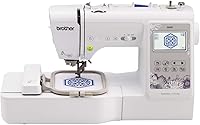
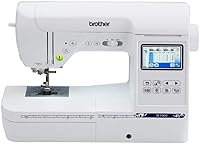
Brother SE700 vs SE725: What Is the Difference?
The main difference between Brother SE700 and SE725 is the embroidery field: the SE700 stitches a 4 x 4 inch area, and the SE725 gives you 5 x 7 inches. The SE700 also adds wireless LAN and the Artspira app for sending designs without a cable.
On this page (7 sections)
- What is the actual difference between the Brother SE700 and SE725?
- Which embroidery area suits the projects you plan to make?
- How does wireless sending change daily use on the SE700?
- What should you know about the Brother SE700 sewing side?
- What supplies do you need for each embroidery field?
- Do magnetic hoops make either machine easier to use?
- Which machine should a beginner buy?
The difference between Brother SE700 and SE725 comes down to embroidery area. The SE700 stitches inside a 4 x 4 inch field and connects over wireless LAN, while the SE725 opens up a 5 x 7 inch field for larger designs.
Both are Brother sewing and embroidery combos built for people starting out.
Choosing between them is really a question about what you want to make. Small monograms, pocket designs and patches fit the SE700 easily.
Bigger back-of-jacket art and full tote fronts need the SE725's extra space. The rest of this guide works through the practical differences and who each machine suits.
What is the actual difference between the Brother SE700 and SE725?
The embroidery field is the headline difference: 4 x 4 inches on the SE700 versus 5 x 7 inches on the SE725. Everything else follows from that, from hoop size to how much stabilizer you buy.
The SE700 also comes with wireless LAN and Brother's Artspira mobile app. That lets you draw a design on your phone or download a pattern and send it to the machine without a cable.
It has 135 built-in designs, 10 embroidery fonts and a 3.7 inch color touchscreen for editing on screen before you stitch.
The SE725 is the same family of combo machine, so sewing and embroidery still live in one unit. What changes is the reach of the embroidery arm.
A larger field means longer stitch-outs, more fabric handling and bigger hoops to store. For a beginner deciding between the two, the honest answer is that the SE725's bigger field is the reason to spend more, and the SE700's smaller field is the reason it is the easier place to start.
Is the SE725 just an SE700 with a bigger hoop?
Not quite. The embroidery field is set by the machine, so the SE725's 5 x 7 inch area is part of its build, not an add-on hoop you can fit to the SE700.
That is why the choice matters at the start rather than later.
Hoop size is the visible sign of the difference. The SE700 ships with a 4 x 4 inch frame.
A 5 x 7 inch design needs a 5 x 7 inch hoop, so the two machines pull from different hoop sets and different stabilizer cuts. Our guide to 4x4 vs 5x7 embroidery machines walks through what each field size can and cannot do.
Which embroidery area suits the projects you plan to make?
If your plans fit inside 4 x 4 inches, the SE700 covers them. That includes names on collars, small logos on pockets, bookmarks, key fobs and baby bibs.
These are the projects most beginners actually start with.
A 4 x 4 inch field also means less to manage on each project. You hoop a smaller piece of fabric, use a smaller piece of stabilizer and watch a shorter stitch-out finish.
Mistakes cost less time and less thread.
The SE725's 5 x 7 inch field opens up bigger work. That covers adult shirt backs, tote bag fronts, jacket panels, large monograms and designs that combine several motifs into one layout.
If your goal list already includes those projects, the bigger field saves you from outgrowing the machine in the first month.
How does wireless sending change daily use on the SE700?
Wireless LAN lets you move a design from your computer or phone to the machine without a USB stick. Brother's Design Database Transfer software sends files from a PC over the network, and the Artspira app does the same from a mobile device.
That matters most when you change designs often. Instead of carrying a USB drive back and forth to a computer, you pick the next design and send it.
The built-in USB port is still there as a backup for when you would rather use a stick.
Artspira goes a step further and lets you draw a design on your phone. You can sketch something custom and transfer it straight to the SE700.
That suits simple one-off lettering and shapes, though it is not a replacement for full embroidery software.
The SE700's screen plays a part too. The 3.7 inch color touchscreen shows the design before you stitch, so you can rotate, resize and reposition it on screen.
Checking a layout there beats finding a placement problem after the needle starts.
What should you know about the Brother SE700 sewing side?
The SE700 is a real sewing machine, not just an embroidery arm. It has 103 built-in sewing stitches, including 10 styles of one-step auto-size buttonholes, plus an automatic needle threader and a drop-in top bobbin.
Those features matter for a first machine because repairs and simple garments come up before embroidery does. Hemming curtains or patching a seam is a normal early task.
Having both functions in one footprint means one machine on the table instead of two.
The SE700's sewing work area measures 6.4 x 4.0 inches. The machine weighs about 15.6 pounds and measures 16.5 by 7.76 by 12.09 inches, so it fits a standard desk without taking over the room.
Eight sewing feet come in the box, covering zigzag, monogramming, overcasting, zipper, blind stitch, button fitting, buttonhole and embroidery.
A 4 x 4 inch hoop, embroidery arm and two bobbins are included as well. That is enough to stitch the built-in designs right away without buying extras first.
Brother's US warranty runs 2 years on electronic components and printed circuit boards and 1 year on parts, labor and accessories.
How does the SE700 compare with other beginner Brother combos?
The SE700 sits in the middle of Brother's beginner combo line. It adds wireless and the touchscreen over older 4 x 4 inch models, which makes sending designs easier for people who work from a laptop.
If you are weighing the entry models against each other, the Brother SE600 vs SE700 comparison covers the step up in connectivity. For an even smaller, simpler starting point, the Brother Skitch vs SE700 piece looks at the lightest option in the family.
Both help you see what each jump in price actually buys.
What supplies do you need for each embroidery field?
Fabric, stabilizer and thread are the three basics, and the field size sets how much of each you use. A 4 x 4 inch project needs less of everything, which keeps practice cheap.
Stabilizer is the item beginners underestimate. Cut it a little larger than the hoop, so the SE700's 4 x 4 inch hoop takes roughly 6 inch squares and 5 x 7 inch hoops need pieces around 7 x 9 inches.
Precut squares in the matching size save trimming time and waste.
Thread is the next cost. A 40 spool kit covers color changes and small designs without buying single spools for each new project.
The brothread 40 Color Thread Kit holds 40 weight polyester spools in 40 colors, each 500 meters long. New brothread says the polyester resists breaking and holds its color through washing and harsh chemicals, which matters when a design has several color stops.
Do magnetic hoops make either machine easier to use?
Magnetic hoops speed up hooping and reduce hoop marks, and they suit both machines when the size matches the field. You lift a magnet, straighten the fabric and reattach instead of tightening a screw frame.
That saves time on every project and helps when fabric shifts under a regular hoop. The MagnaHoop Set for SE700 and PE545 is a 3-in-1 kit with a coated metal bottom frame that protects fabric and holds it firmly.
MagnaHoop lists the SE725 among the machines it fits as well.
Check the hoop size against your field before buying. A magnetic set sized for a 4 x 4 inch field won't frame a 5 x 7 inch design, so match the hoop to the machine you choose.
Magnetic hoops also need fabric with enough body to grip; very thin, stretchy fabric can slip free.
Which machine should a beginner buy?
Pick the Brother SE700 if you want the easier, more connected start and your projects fit in 4 x 4 inches. Its 135 built-in designs, 10 fonts, wireless sending and touchscreen cover the first year of small projects well.
Pick the Brother SE725 if your project list already needs 5 x 7 inches. Bigger shirt backs, tote fronts and combined layouts need the larger field, and buying it up front costs less than replacing a 4 x 4 inch machine later.
The difference between Brother SE700 and SE725 is mostly about how much space you need and how much convenience you want. If you are unsure, look at the designs you actually want to stitch and measure them.
Anything under 4 inches square points to the SE700; anything wider or taller points to the SE725. When you move up to a bigger machine later, the Brother SE1900 vs SE2000 comparison shows what the next tier adds.
Frequently asked questions
Is the Brother SE700 a good first embroidery machine?
Yes. It combines sewing and embroidery in one unit, has 135 built-in designs and 10 lettering fonts, and the touchscreen walks you through edits.
A 4 x 4 inch hoop keeps early projects small and cheap to practice.
Do the SE700 and SE725 use the same accessories?
Hoops are the part that differs. The SE700 ships with a 4 x 4 inch frame, while the SE725 needs 5 x 7 inch hoops for its larger field.
Bobbins and most sewing feet are shared across the family, so spare bobbins carry over.
Can I upgrade the SE700 to a 5 x 7 inch embroidery field?
No. The embroidery field is set by the machine's arm and firmware, so a bigger hoop does not extend the stitching area on the SE700.
If large designs are your goal from day one, start on a 5 x 7 inch model instead.
Which machine is easier for a total beginner to learn on?
The SE700 is the gentler start. A smaller field means less fabric to hoop, shorter stitch-outs and fewer stabilizer choices, and its wireless sending removes the USB cable step.
Move up once small designs feel routine.
What size stabilizer do I need for each machine?
Cut stabilizer a little larger than the hoop. The SE700's 4 x 4 inch hoop takes roughly 6 inch squares, while 5 x 7 inch hoops need pieces around 7 x 9 inches.
Buy precut squares in the matching size to save trimming time.