Brother Skitch vs SE700: Which Is Better? (October 2026)
Choose the Skitch for app-based embroidery, or the SE700 if you also need a sewing machine. Both have a 4 x 4 in embroidery field, but the SE700 also sews and has a touchscreen.
On this page (9 sections)
- Brother Skitch vs SE700: which should you choose?
- What does the SE700 do that the Skitch can't?
- How do the Skitch and SE700 transfer embroidery designs?
- Which machine gives you more design controls?
- Which machine takes up less room?
- Which Brother machine is the better match for a beginner?
- Is the PE545 a third option?
- What should you check before choosing?
- Brother Skitch vs SE700: which one fits your plans?
Choose the Skitch for app-based embroidery, or the SE700 if you also need a sewing machine. Both have a 4 x 4 in embroidery field, but the SE700 also sews and has a touchscreen.
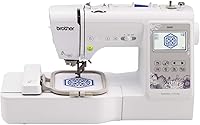
The main difference in this Brother Skitch vs SE700 comparison is what each machine does. The Skitch embroiders only and uses Artspira, while the SE700 combines sewing and embroidery with several design-transfer options.
Both have a 4 x 4 in embroidery area. If sewing is already covered and you want an embroidery-only machine, the PE545 is another Brother option to compare.


Brother Skitch vs SE700: which should you choose?
Pick the SE700 if you need sewing and embroidery in one machine; pick the Skitch if you want an embroidery-only setup centered on Artspira. Their shared 4 x 4 in field means the deciding factor is function and workflow.
The SE700 includes 103 built-in sewing stitches, 135 embroidery designs and 10 embroidery lettering fonts. Its 3.7 in color touchscreen lets you edit and preview designs on the machine.
The Skitch has Bluetooth and transfers designs through the required Artspira app. It has a small footprint, but it cannot sew.
| Product | Best for | Embroidery area | Machine type | Design transfer | Our score |
|---|---|---|---|---|---|
| Brother SE700 | sewing and embroidery | 4 x 4 in | Sewing and embroidery | Wireless LAN or USB | 8.8 |
| Brother PE545 | touchscreen embroidery | 4 x 4 in | Embroidery only | Wireless LAN or USB | 8.2 |
| Brother Skitch | app-led embroidery | 4 x 4 in | Embroidery only | Bluetooth through Artspira | 6.6 |
What does the SE700 do that the Skitch can't?
The SE700 can sew as well as embroider, while the Skitch only embroiders. If you want one machine for garment repairs, seams or other sewing tasks alongside embroidery, the SE700 is the direct choice.
The SE700 has 103 built-in sewing stitches, including 10 styles of one-step auto-size buttonholes. It comes with 8 sewing feet and an automatic needle threader.
The Skitch can customize ready-made clothes, towels and blankets with embroidery. It does not function as a traditional sewing machine, so plan on a separate one if you choose it.
If the SE700's sewing and embroidery combination is the main draw, compare it with the Brother SE600 vs SE700 guide. That comparison can help narrow the choice between Brother combo machines.
How do the Skitch and SE700 transfer embroidery designs?
The Skitch sends designs through Bluetooth and Artspira; the SE700 supports wireless network transfer and USB. Choose the workflow that matches where your designs come from and the devices you plan to use.
Artspira is required for the Skitch. The free version lets you import PES, PHC, PHX or DST files and store up to 20 designs at a time.
You can remove designs and add others as needed.
The SE700 can receive files from a PC through Brother's free Design Database Transfer software when connected to a wireless network. It also has a built-in USB port, and Artspira can send designs to it wirelessly.
Check the file type and transfer steps before you buy. Our PES, DST or JEF guide explains common formats and what to check when choosing a design file.
Which machine gives you more design controls?
The SE700 offers on-screen editing and preview; the Skitch centers design creation and transfer in Artspira. The right choice depends on whether you want to make adjustments on the machine or in a mobile app.
The SE700's 3.7 in color touchscreen lets you position, edit and preview embroidery designs before stitching. It also includes 135 built-in designs and 10 embroidery lettering fonts.
With the Skitch, the required Artspira app is the starting point for drawing or importing designs and sending them over Bluetooth. Its free app can store up to 20 imported designs at once.
Neither machine has a larger embroidery field than the other. If you expect to stitch bigger designs in one placement, read our guide to embroidery machines with a large hoop before settling on a 4 x 4 in model.
Which machine takes up less room?
The Skitch is described as having a small footprint. The SE700 measures 16.5 x 7.76 x 12.09 in in depth, width and height, so compare those figures with your table space and storage plan.
The SE700's measurements don't tell you how much working space you'll need around it. Leave room for the fabric, hoop movement and power connection.
The embroidery machine table guide can help you plan a work area. Measure the full table surface before deciding whether a machine will fit your setup.
Which Brother machine is the better match for a beginner?
The SE700 suits a beginner who wants to learn sewing and embroidery together; the Skitch suits one who wants to focus on embroidery through an app. Think about the first projects you want to make, not just the number of built-in designs.
The SE700 combines sewing functions with embroidery, and its touchscreen offers editing and preview tools. It can handle both fabric construction and decoration.
The Skitch focuses on embroidery. Artspira is required, and its 4 x 4 in area supports embroidery placements on items such as clothing and towels.
For a wider overview of the first supplies and setup choices, start with machine embroidery for beginners. It can help you judge whether embroidery-only or a sewing and embroidery combo fits your plans.
Is the PE545 a third option?
The PE545 is worth considering if you want embroidery only, with a touchscreen and wireless or USB transfer. It shares the Skitch's embroidery-only role but has a 3.7 in touchscreen and 135 built-in designs.
The PE545 has a 4 x 4 in embroidery field and 10 built-in fonts. Its screen lets you position designs, make edits and preview them before stitching.
It does not sew, so it won't replace a sewing machine for repairs or garment construction. Compare it with the Brother Skitch review for a closer look at the Skitch's app-based setup.
What should you check before choosing?
Match the machine to your sewing needs, design-transfer habits and available work area. Both Skitch and SE700 have a 4 x 4 in embroidery area.
Before deciding, consider:
- Whether you need built-in sewing stitches or already own a sewing machine.
- Whether you want to work through Artspira, transfer from a PC over a wireless network, or use USB.
- Whether you are comfortable with a 4 x 4 in embroidery area.
- Whether your table has space for the machine and the fabric you plan to hoop.
For machine comparisons across the Brother range, see best Brother embroidery machines for home use. It offers a broader view if neither workflow feels like the right fit.
Brother Skitch vs SE700: which one fits your plans?
Choose the SE700 when you want sewing and embroidery in one machine; choose the Skitch for app-led embroidery. The PE545 is another embroidery-only option if a touchscreen and wireless or USB transfer matter more than sewing.
The shared 4 x 4 in field makes project size a common limit. Pick based on how you want to create and transfer designs, then review embroidery file formats if you plan to use files you already have.
Frequently asked questions
Can the Brother Skitch sew?
No. The Skitch is an embroidery-only machine, so it cannot sew seams, hems or repairs.
The SE700 combines embroidery with 103 built-in sewing stitches, making it a fit if you want one machine for both kinds of work.
Do the Skitch and SE700 have the same embroidery area?
Yes. Both machines have a 4 x 4 in embroidery area.
That is the size of the embroidery field.
Check your design dimensions to see whether they fit.
Does the Brother Skitch need an app?
Yes. The Skitch uses the required Artspira mobile app to create and send embroidery designs over Bluetooth.
The free app can import PES, PHC, PHX and DST designs and store up to 20 at a time.
You can remove designs and add others.
Can the SE700 transfer designs without a USB cable?
Yes. The SE700 can receive embroidery files over a wireless network through Brother's Design Database Transfer software.
It also has a built-in USB port, so you can transfer designs by USB.