Janome vs Brother Embroidery Machines: Which Is Better? (October 2026)
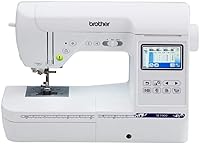
For a Janome vs Brother embroidery machine choice, pick the Brother SE700 for wireless transfers and a 4 x 4 inch combo, the Janome Memory Craft 1000 for a larger combo field, or the Memory Craft 400E for a 7.9 x 7.9 inch embroidery field.
On this page (8 sections)
- Janome vs Brother embroidery machine: which fits your projects?
- What does each model offer?
- Which machine suits a home sewing workspace?
- When is the Janome Memory Craft 400E a better fit?
- Janome Memory Craft 1000 vs Brother SE700: which combo is a better match?
- What setup choices help prevent embroidery mistakes?
- What should you check before buying?
- Which Janome or Brother embroidery machine is right for you?
For a Janome vs Brother embroidery machine decision, choose the Brother SE700 for wireless transfer in a 4 x 4 inch combo, the Janome Memory Craft 1000 for a larger combo field, or the Janome Memory Craft 400E for embroidery designs up to 7.9 x 7.9 inches. All three have built-in designs and touchscreen editing, but their sewing features and ways of bringing in designs differ.
The SE700 and Memory Craft 1000 combine sewing and embroidery. The 400E is embroidery-only, which makes it a better match for a home that already has a sewing machine and wants a dedicated embroidery unit.
Start with the largest design you plan to stitch, then ask whether you want one machine to sew and embroider. Our guide to Brother embroidery machines covers other Brother options.


Janome vs Brother embroidery machine: which fits your projects?
The field sizes are 4 x 4 inches for the SE700, 5.5 x 5.5 inches for the Memory Craft 1000 and 7.9 x 7.9 inches for the Memory Craft 400E. Choose a field that fits your usual designs, not just the biggest design you might make once.
A larger field can hold a larger single design, but it also calls for suitable fabric placement and room for the hoop to move. A smaller field can work well for names, small motifs and compact details, especially when your projects are clothes or accessories with limited space.
Think about whether you want two functions in one machine or a dedicated embroidery machine. The combo models can handle regular sewing as well as embroidery, while the 400E focuses on embroidery.
If you're weighing field sizes, our 4 x 4 vs 5 x 7 embroidery machine guide explains how size affects project planning. For more large-field options, see our guide to embroidery machines with large hoops.
What does each model offer?
The SE700 emphasizes connected design transfer, the Memory Craft 1000 pairs a mid-size field with sewing, and the Memory Craft 400E gives more space to larger embroidery. Each has built-in designs and on-screen editing, so the best fit depends on how you plan to create.
The SE700 has 135 embroidery designs and 10 embroidery lettering fonts, along with 103 sewing stitches. Its 3.7 inch color touchscreen previews and edits embroidery designs.
The Memory Craft 1000 has 241 embroidery designs and 300 sewing stitches. On its 3.5 inch color touchscreen, you can resize, rotate, flip, arc, combine and monogram designs.
The Memory Craft 400E has 160 built-in designs and 6 monogram fonts. Its touchscreen supports rotating, resizing, mirroring and combining patterns.
The machine includes 4 hoops and imports custom designs via USB.
These counts describe built-in choices, not a promise that one library will match your taste. Before buying, consider whether you tend to use built-in motifs, personalize lettering or bring your own designs.
How does each Janome vs Brother model handle design transfer?
The Brother SE700 gives you wireless, app and USB routes for designs. The Memory Craft 400E supports USB import, while the Memory Craft 1000 offers editing for built-in designs.
The SE700 can receive embroidery files from a PC over a wireless network through Design Database Transfer. The Artspira app lets you draw a pattern on a mobile device or download patterns and transfer them wirelessly; USB is another option.
The Memory Craft 400E supports USB import and PC-compatible AcuStitch software. The Memory Craft 1000 can edit built-in designs on screen, but its outside-design transfer method is not specified here, so confirm that point if importing files is central to your plans.
Check file compatibility before you build a library around designs you already own. Our PES, DST and JEF format guide explains the common formats and what to check when choosing a design.
Which machine suits a home sewing workspace?
The SE700 is the lightest of these three, while the 400E provides the largest embroidery field. Weight and footprint matter, but allow extra tabletop room for fabric and hoop movement too.
The SE700 weighs 15.6 pounds, the Memory Craft 1000 weighs 22 pounds, and the 400E weighs 25 pounds. The Memory Craft 1000 uses a rear-attachment embroidery arm, a design that can help keep the desktop footprint compact.
Measure the table and storage area with the machine's embroidery setup in mind. Large fabric pieces need room to lie flat and move without catching on nearby objects, even when the machine itself fits on the table.
Choose the combo format if you want one machine for garment construction and embroidery. Skip the SE700 and Memory Craft 1000 if you already own a sewing machine you like and don't need another set of sewing functions; the 400E is embroidery-only.
When is the Janome Memory Craft 400E a better fit?
Choose the Memory Craft 400E when you want more room for single designs and already have sewing covered. Its 7.9 x 7.9 inch embroidery field is the largest of these three.
The 400E is suited to larger motifs and monograms that would not fit comfortably within a 4 x 4 inch field. It includes 4 hoops, 160 built-in designs and 6 monogram fonts, with on-screen controls for resizing, mirroring, rotating and combining patterns.
Skip it if you need a machine for ordinary sewing as well as embroidery. Also consider whether its larger capacity fits your actual projects: a large field does not help much if most of your work is small labels or compact garment details.
Good embroidery still depends on stable fabric and careful hooping. Choose a stabilizer suited to the fabric and design, and smooth the material flat before stitching.
Check the hoop placement before starting. Our guide to tear-away embroidery stabilizer covers one common stabilizer type and where it can help.
Janome Memory Craft 1000 vs Brother SE700: which combo is a better match?
Choose the Memory Craft 1000 for a larger field and more built-in embroidery designs; choose the SE700 for wireless transfer and app support. Both combine sewing and embroidery, but their strengths serve different routines.
The Memory Craft 1000 has a 5.5 x 5.5 inch field, 241 built-in designs and 300 sewing stitches. Its easy hoop tightening system uses a two-stage lever to position fabric before locking it in place.
The SE700's 4 x 4 inch field is smaller, with 135 built-in embroidery designs and 103 sewing stitches. Its wireless LAN, USB and Artspira options give you several ways to bring in designs.
Pick the Memory Craft 1000 if you want a bigger working area and more built-in choices, and you are comfortable with its design workflow. Pick the SE700 if wireless file transfer is a priority and a 4 x 4 inch field covers your usual projects.
For another Brother combo comparison, see Brother SE600 vs SE700.
What setup choices help prevent embroidery mistakes?
A correctly sized design, secure hooping and stable fabric are the basic checks to make before stitching. These habits reduce avoidable misalignment and help keep a design inside the field.
First, match the design dimensions to the machine's embroidery field and the hoop you plan to use. A design that is too large for the available area may need a smaller version or a different project plan.
Next, position the fabric and stabilizer smoothly in the hoop. Keep the material flat and evenly supported; loose fabric can shift, while excessive pulling can distort the area you want to embroider.
On the Memory Craft 1000, use its two-stage lever to position the hoop before locking it.
Thread and needle choices also matter. Follow the machine's instructions for threading and needle selection.
Pause if the thread breaks or the fabric shifts. Avoid tugging the fabric while stitching, since the machine needs to move it through the embroidery area.
For a first project, choose a simple design on stable fabric, then learn the machine's controls before moving to a garment or a bulky item. Our machine embroidery for beginners guide covers the basic supplies and setup steps.
What should you check before buying?
Compare the largest designs you expect to stitch, your need for sewing, and your preferred way to transfer files. These three choices narrow the field more reliably than choosing by brand name alone.
Check that the field and hoop can accommodate the design, with enough surrounding fabric to hoop it securely. If a design exceeds the field, you may need to split it, use a smaller version or choose another motif.
Confirm voltage and support for your location. The SE700 is intended for sale in the US at 120 volts, so buyers elsewhere should verify compatibility before choosing it.
Plan for thread, needles, stabilizer and a stable work surface. Thread choice can affect how a design looks and stitches, so see our machine embroidery thread sets guide when planning supplies.
Which Janome vs Brother embroidery machine should you skip?
Skip the SE700 if your regular designs need more than a 4 x 4 inch field, and skip the 400E if you need built-in sewing. Skip the Memory Craft 1000 if you want embroidery-only operation or depend on a clearly specified outside-file transfer route.
These are useful limits to consider before you buy. A generous design library cannot compensate for a field that is too small, and a bigger field is not a reason to choose a machine that lacks the sewing functions you need.
Which Janome or Brother embroidery machine is right for you?
Choose the Brother SE700 for wireless transfers and a compact sewing and embroidery combo; choose the Memory Craft 1000 for a larger all-in-one field; choose the Memory Craft 400E for large embroidery when sewing is already covered. This is the clearest way to decide among these models.
For a Janome vs Brother embroidery machine choice, match the field to your largest routine project, then decide whether you value built-in sewing or connected design transfer more. If you're unsure about the project size, start with the smallest designs you expect to make and check whether the next larger field would change what you can stitch.
Frequently asked questions
Which is better, Janome or Brother for embroidery?
Neither brand is the better choice for every project. The Brother SE700 suits a compact sewing and embroidery setup with wireless transfer, while the Janome Memory Craft 400E suits large single designs.
The Janome Memory Craft 1000 is a middle option if you want both crafts in one machine and a field between those sizes.
Which machine has the largest embroidery area?
The Janome Memory Craft 400E has the largest field of these 3 models at 7.9 x 7.9 inches. The Memory Craft 1000 offers 5.5 x 5.5 inches, and the Brother SE700 offers 4 x 4 inches.
Choose based on the actual design dimensions, and remember that the fabric and hoop need room around the stitching area.
Can these machines sew as well as embroider?
The Janome Memory Craft 1000 and Brother SE700 combine sewing and embroidery. The Memory Craft 400E is embroidery-only, so it won't replace a sewing machine for garment construction or everyday seams.
If you already have a sewing machine, the 400E's dedicated embroidery setup may suit you.
How do designs transfer to these machines?
The SE700 supports wireless transfer through Design Database Transfer and the Artspira app, and it also has USB. The Memory Craft 400E imports custom designs via USB.
The Memory Craft 1000 offers on-screen editing for built-in designs.
Check the machine instructions for the supported way to add outside designs.
What should you check before buying an embroidery machine?
Start with the largest design you expect to stitch, then compare it with the machine's embroidery field and included hoop. Decide whether you need sewing functions, built-in editing or wireless transfer.
For format basics, see our guide to PES, DST and JEF files.